
July 06, 2026
Video Annotation at Scale: Interpolation, Object Tracking, and the Time Math
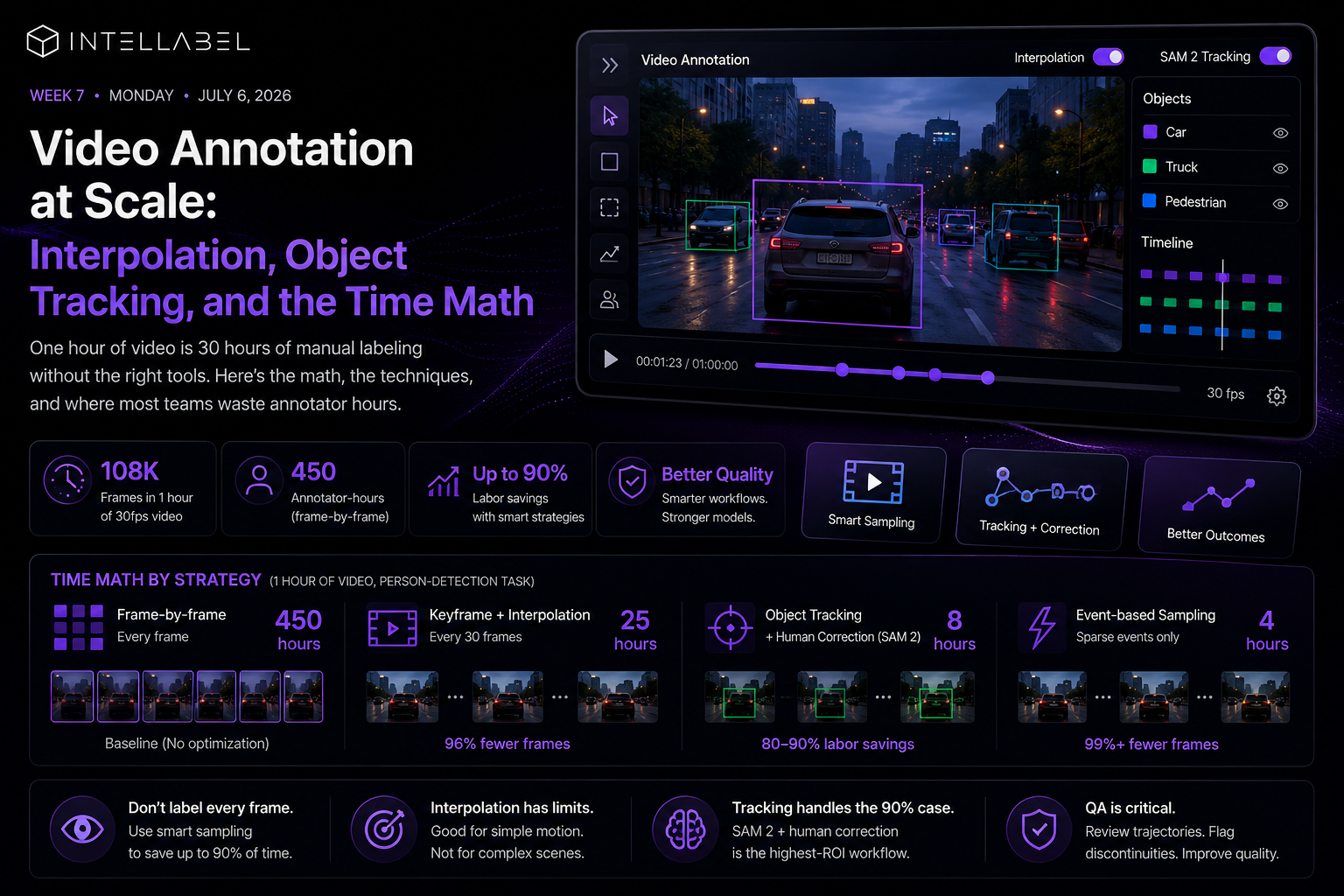
An hour of 30fps video is 108,000 frames. At 15 seconds of annotation per frame and one bounding box per frame, that's 450 annotator-hours — over 50 working days for a single video. Most teams hit this wall in week two of their first video project and panic-shop for new tools.
The math is real. The solutions exist. Here's the practical playbook.
Don't label every frame. You can't afford to.
The single most consequential decision in video annotation is choosing your sampling strategy. Three patterns work in practice.
Keyframe + interpolation: annotate every 30th frame (one per second), let interpolation fill the gaps. Reduces frame count by 96%. Works for slow-moving objects and continuous motion.
Event-based sampling: annotate only frames where something changes (object enters, object exits, action starts). Reduces frame count by 99%+ for sparse-event videos. Requires a quick first-pass event detector.
Object tracking with periodic correction: label first frame, run object tracker (DeepSORT, ByteTrack, or SAM 2 video mode) across the sequence, have humans correct only where tracking fails. Reduces labor by 8090% on continuous-motion footage.
Interpolation isn't a free lunch
Linear interpolation between bounding boxes works fine for objects moving in straight lines at constant speed. It breaks on rotation, occlusion, and acceleration. For anything beyond simple translation, use spline interpolation or a learned tracker.
Quality cost: interpolated frames are 5-15% less accurate than human-labeled ones. For training data, this is usually acceptable. For evaluation sets, label manually.
Object tracking handles the 90% case
SAM 2's video mode is the breakout improvement of the last 18 months. Given a first-frame mask or bounding box, it tracks across thousands of frames with quality that approaches frame-by-frame manual annotation for many domains. The labeling pattern becomes: annotate frame 0, accept or correct frames 1N.
For most computer vision projects in 2026, SAM 2 + human correction is the highest-ROI video annotation workflow available. The labor savings are 70-90% vs frame-by-frame.
Time math by strategy
An hour of video, person-detection task. Frame-by-frame: 450 hours. Keyframe + linear interpolation (every 30 frames): 25 hours. Object tracking + human correction (SAM 2): 8 hours. Event-based with first-pass detector: 4 hours, but only viable for sparse events.
Picking the wrong strategy doesn't just cost time — it costs the project. A 450-hour annotation bill on a small project ends it.
QA is harder, not easier
Reviewing video annotations is harder than reviewing image annotations because reviewers have to play frames in sequence, not glance. Build review tools that show object trajectories overlaid on the video and flag tracking discontinuities — the places where the tracker dropped the object are the places to focus QA.
Where the platform matters
Most annotation tools were built for images. Video support was bolted on. Intellabel's video annotation includes interpolation, SAM-2-based tracking, and event-based sampling as first-class workflows — meaning the time math above is what you actually get, not what's theoretically possible with a separate tracker pipeline.
The fastest video project is the one where annotation, tracking, and correction happen in one workspace. The slowest one is the project where you exported frames, tracked in a Jupyter notebook, and re-imported corrections.
From Labeling to Structured AI Data Pipelines


Address: WeWork, Salarpuria Symbiosis, Bannerghatta Rd, Bengaluru, Karnataka

.png)